On this page (13)
From account to first order
Registration and setup, in detail
Complete the actions on the platform, then return to your StepToDrop tasks. Screens can differ by country and account type. Reading this guide does not automatically complete registration.
New section · 23 October 2026 · StepToDrop editorial team
Create the appropriate account
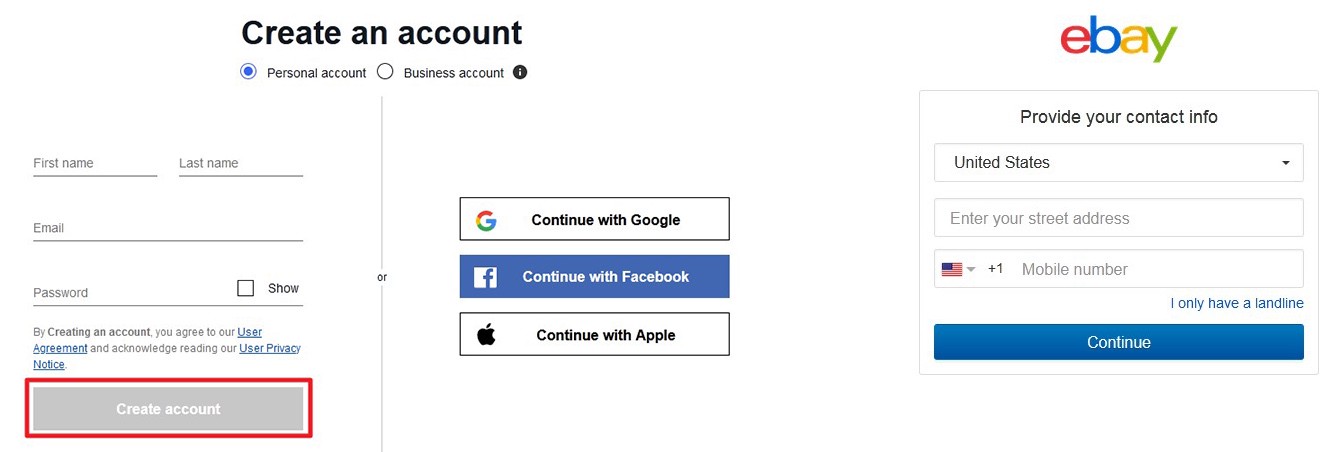
- Use eBay’s official registration page. Provide your name, email and sign-in method, then the requested contact details. Sign in if you already have an account.
- Choose an account type that matches your activity. Do not represent a commercial business as a private seller merely to simplify the form.
Example. A customer-facing brand and the owner’s legal details serve different purposes.
Checkable result: You can sign in to the right account, contacts are current, and the account type is appropriate.
Start seller setup
- Open Sell and follow seller setup. eBay verifies identity, business details when applicable, and the payout method.
- Use factual details. Documents and payout options vary by country; US requirements must not be assumed to apply elsewhere.
Example. Being signed in to eBay does not itself confirm readiness to sell and receive payouts.
Checkable result: You can see your account’s specific requests and know what remains to finish setup.
Review payouts and verification status
- In the official payout form, check that the account holder and account type match the seller details. If requested, submit readable documents through eBay.
- If delayed, read the reason in your account. Resolve the specific mismatch; do not create a second account to bypass verification.
Example. Document submitted → review pending → decision received. These are different task states.
Checkable result: Payout status has been checked in eBay, and your learning status matches the actual result.
Check limits before listing
- In Seller Hub → Overview, find Monthly limits. Check the available quantity and amount before preparing a large catalog.
- Start with a volume you can fulfill. Request increases through eBay’s provided process; an automatic increase is not guaranteed.
Example. A store subscription and a selling limit are different things. Do not buy a plan merely expecting it to bypass a limit.
Checkable result: Your initial listing plan fits the account’s actual limit.
Prepare one accurate listing
- Check the permitted sourcing model in the section below. Then prepare an accurate category, item specifics, condition, photos and price for one product.
- State the actual item location, handling time, shipping and returns. Compare the listing’s promises with confirmed supplier terms.
Example. A new and a refurbished item are not equivalent offers when comparing prices.
Checkable result: The listing draft is accurate, costs are calculated, and fulfillment is agreed.
International selling · US and Europe
Seller country and customer market
The learning focus is customers in the US and Europe, including the EU and UK. Choose Canada, Australia or another market separately to match your product and delivery plan. A seller may be based in Azerbaijan or another country: registration and payout eligibility depend on their real details.
- Residence
- Your real, verifiable address.
- Business
- Where your business actually operates and is registered when required. The platform or provider verifies its details.
- Customers
- Where you sell. Selecting a US market does not change your documents, business country or payout eligibility.
Where to start
- Check your country in eBay’s eligible seller-address list. Start with your real address, independently of your customer market. For example, Azerbaijan Republic is listed; eligibility is not account approval or a guarantee of a specific payout method.
- Open My eBay → Selling. Create or use your account and select the account type appropriate for your activity. Personal and business details must match your documents.
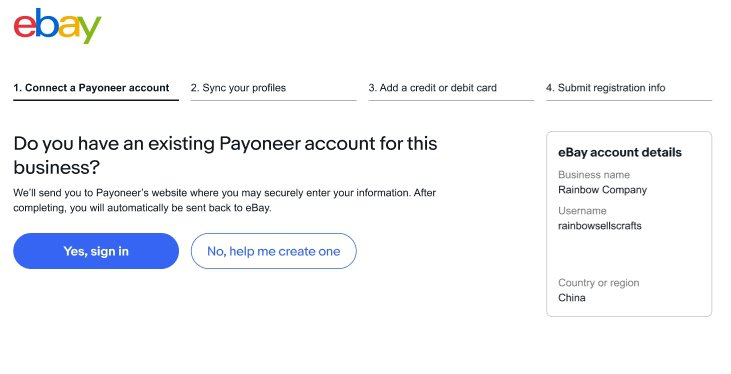
- Follow the payout route offered during your onboarding. If Payoneer is offered, match the country and account type across both platforms. Do not copy US SSN or US bank-account requirements from a US guide.
- Wait for verification and review seller limits. Confirm the wholesale supplier, actual item location, handling time, shipping and returns.
- Create one draft listing and check costs. After launch, monitor the first real order, tracking and payout. Do not create fake purchases for feedback or to bypass verification.
Outcome: You know what is confirmed in the dashboard, what is pending and what to do next. An unconfirmed payout route remains a launch blocker.
Checked 23 Oct 2026. Availability depends on the actual account and provider requirements.
View official eBay screens
Official eBay examples open on the source site. Your screens and sequence may differ.

eBay gives sellers access to an established marketplace audience, but not every form of dropshipping is allowed on the platform.
The key is to understand the fulfillment model and the seller’s responsibilities.
Even when a third-party supplier ships the product, the seller remains responsible to the buyer and eBay for listing accuracy, delivery times, shipping and resolving problems.
StepToDrop Editorial Team · Last checked:
The key eBay rule
eBay allows dropshipping when orders are fulfilled directly through a wholesale supplier.
Listing a product on eBay and then, after receiving an order, buying it from another retailer or marketplace that ships it to the customer is not allowed.
Before listing a product, make sure your supply model complies with eBay’s rules.
Official eBay dropshipping policy — external source, opens in a new tab.
Step 1. Choose a permitted model
Before creating listings, check:
- who the actual supplier is;
- whether you have a working agreement or relationship with the supplier;
- whether they can fulfill orders directly to customers;
- whether stock is consistently available;
- how long order processing takes;
- how tracking is provided;
- how returns and order problems are handled.
Do not build an eBay business around “receive an order → find the product at another retailer → have it sent to the customer.”
Step 2. Check the supplier
The supplier affects more than your purchase price.
Check:
- actual stock availability;
- the actual shipping origin;
- processing time;
- shipping time;
- tracking;
- packaging;
- returns;
- how damaged or incorrect items are handled;
- support;
- inventory consistency.
A low-cost supplier with unreliable shipping can end up costing more through returns, cancellations, compensation and customer problems.
How to choose and check a dropshipping supplier
Step 3. Prepare your business policies
Buyers should clearly understand:
- payment methods;
- shipping;
- handling time;
- shipping costs;
- return terms.
eBay uses business policies to manage these settings. Choose settings that suit the particular products and market: one universal policy will not work for every country and category.
Exception: since 20 July 2026, business policies no longer apply to listings in the Vehicles category. eBay provides separate settings for that category.
Business policies: official eBay guidance — external source, opens in a new tab.
Step 4. Create accurate listings
Check:
- product title;
- condition;
- item specifics;
- description;
- images;
- item location;
- availability;
- shipping information;
- handling time;
- return terms.
Listing information must match the actual product and the actual fulfillment process.
It is particularly important not to give an incorrect item location or promise faster delivery than the supplier can provide.
Official eBay selling practices policy — external source, opens in a new tab.
Accurate shipping origin: item location
State the actual location from which the supplier will ship the item: postal code, city and country. This information must be consistent across the listing title, description and item specifics; tracking after the sale must match the stated shipping origin.
Official eBay item location policy — external source, opens in a new tab.
Step 5. Shipping
If the supplier needs 1–2 business days to process an order and another 4–6 days for delivery, your listing must not suggest that the buyer will receive it in two days.
Check:
- handling time;
- shipping service;
- tracking;
- the actual shipping origin;
- delays;
- whether the promised timeframe matches the real process.
The seller remains responsible for safe delivery within the timeframe stated in the listing.
Step 6. Returns and problems
Before your first sale, understand:
- where returns are sent;
- who pays for return shipping in the applicable situation;
- how defective items are handled;
- what happens if the wrong item arrives;
- what to do if a package is lost;
- how quickly the supplier responds.
Do not copy a universal set of return terms: the terms depend on the particular listing, policy and applicable requirements.
Step 7. Monitor the order after the sale
Dropshipping does not mean the seller can stop monitoring an order.
After the sale, keep track of:
- the supplier’s order confirmation;
- tracking;
- delays;
- buyer messages;
- returns;
- problem resolution.
The buyer interacts with your eBay seller account, so you cannot simply pass responsibility to the supplier.
Common mistakes
- using retail or marketplace arbitrage instead of the permitted model;
- giving an incorrect item location;
- promising unrealistically fast delivery;
- providing no tracking;
- listing a product without confirming availability;
- using an unchecked supplier;
- having no clear return policy;
- providing slow support;
- scaling before testing the fulfillment process.
A practical example
Suppose the supplier takes 2 business days to process an order and delivery takes 5 days.
Adding those periods gives roughly 7 days before any delays. To work out a calendar date, also account for weekends and holidays, and check whether the carrier quotes business days or calendar days.
Do not give buyers a delivery estimate you know is unrealistic just to increase conversions.
Establish the actual process first, then make your listing’s delivery promise.
How to calculate dropshipping profit using actual costs
Selling in the USA: shipping, product safety and launch preparation
What to check before launch
- eBay seller account prepared;
- permitted dropshipping model confirmed by the user;
- supplier checked;
- product selected;
- listing prepared;
- item location accurate;
- shipping and handling configured;
- return arrangements defined;
- order economics calculated;
- readiness reviewed through StepToDrop.
This checklist helps you prepare. Confirmations in StepToDrop do not constitute external verification or approval by eBay.